- Oct 8, 2024
Why isn't my real estate Google Business Profile showing?
- Matt McGee
- Local SEO
It seems like not a week goes by without a real estate agent asking why their Google Business Profile (GBP) page doesn't show up when someone searches "Realtor® near me" or "best real estate agents in [LOCATION]."
There are a lot of reasons why this can happen. One of the most common reasons boils down to a simple issue: too much competition!
Get to know the Google Local Filter
When Google has too many similar businesses at the same location to show in its local search results, it will filter out certain businesses that it believes are duplicates of others -- or too similar.
This happens regularly in real estate (and other professions) because many individual businesses (i.e., agents/teams) work out of the same office, with the same street address, same office phone number and the same main category for your GBP. If your office has 50 real estate agents, that's potentially 50 businesses Google has to choose from for the three businesses that will show up in the local pack.
It's important to understand that you can be filtered for some keywords, but not others. So if someone searches "real estate agents [LOCATION]," you might be filtered. But you might not be filtered if someone searches "military relocation real estate agent [LOCATION]."
What can you do when your GBP isn't showing and is filtered?
There are a few things you can try:
Make sure your GBP is fully complete and optimized, especially for the most relevant local keywords you hope to rank for. My Google Business Profile Guide for Real Estate can help with this.
Whatever website URL you use in your GBP, optimize that page on your website for the local keywords you hope to rank for. If you want to rank for "military relocation real estate agent [LOCATION]," optimize the page on your website for that same term.
Change the primary category in your GBP. This may help you avoid getting filtered by other agents in the same primary category.
Move your map pin at least 200 feet away from the other agents/your office building.
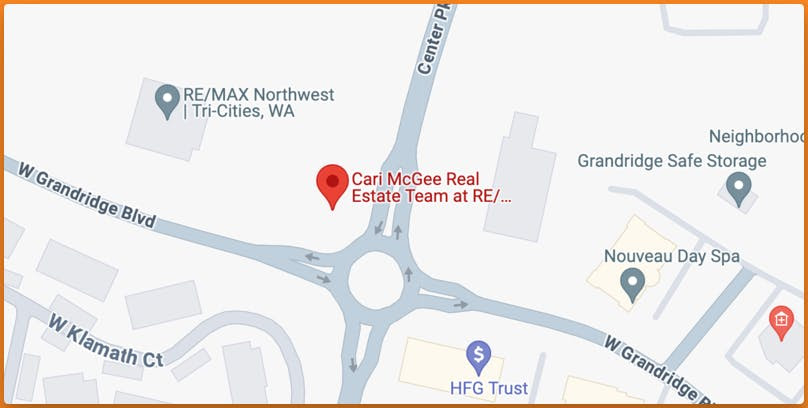
Here's a real-life example of #4 above.
When my wife moved to a different brokerage in 2023, her GBP was quickly filtered from Google's local search results by other agents already at the address. You can see the RE/MAX office in the upper left of the screenshot above.
You can also see how I moved her map pin away from the office to the driveway entrance out near the traffic circle.
Once that change was approved, her GBP stopped being filtered.
That tip is more manageable in situations like this, where you have open space for your moved map pin. If you work in a dense urban setting where 200 feet away is an entirely different building, you may not want to move your pin (for fear of sending visitors to the wrong building).
So if your Google Business Profile isn't showing when people search for real estate agents in your town, you might be stuck in Google's local filter. Try one of these options to get it unstuck and out of the filter.
If you liked this article, you'll love my weekly newsletter. Marketing Unlocked is free and arrives in your inbox every Sunday morning. You can unsubscribe anytime, but 600+ of your industry peers are reading it and raving about it. Click here to learn why and subscribe.
You might also like...